Coming Soon! A Change to How You’ll Get Texts (SMS) From Your School
Posted Date: 06/15/26 (11:32 AM)
Happy Summer PSD Families!
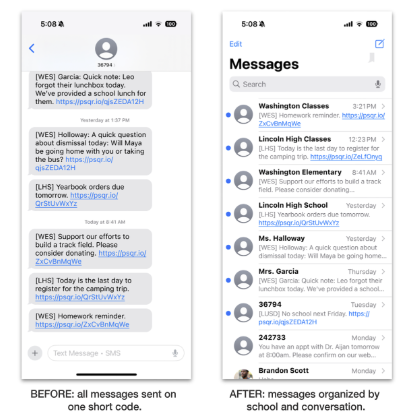
ParentSquare is rolling out a new way to send text messages: instead of using a 5-digit short code, most messages will now come from 10-digit local phone numbers. This change will help messages feel more personal and stay better organized in your text messaging app.
What’s changing?
Previously, all ParentSquare messages came from the same 5-digit number. With this update, you’ll receive texts from regular 10-digit phone numbers, depending on the type of message:
- Direct Messages: One number for each conversation with a teacher or staff member.
- Classroom & Group Posts: One number for all classes and groups per school.
- School-wide Posts: One number per school.
- Alerts, Digests, District-wide Posts and District Group Messages: The same 5-digit number that you've always seen.
No. Emails and app messages will stay exactly the same. This change only affects text messages (SMS).
Why is this happening?
There are two key reasons behind this update:
- A better experience for families: You’ll be able to see who a message is from and keep texts organized by person or school. For example, messages from your child’s teacher will come from a different number than messages from the school office—so it’s easier to stay on top of conversations and know exactly who’s contacting you.
- Industry-wide updates from phone carriers: Phone providers like Verizon, AT&T, and T-Mobile now require messages like these to come from 10-digit phone numbers instead of short codes. This change helps providers reliably deliver messages and avoids providers mistakenly flagging them as spam.
You will get a short message the first time each number is used to help you save it in your contacts.
Here are some suggestions for how to save those contacts:
- Save a teacher’s number as: Mr. Smith - 4th Grade
- Save classroom/group posts as: [Name of School] Classes/Groups
- Save school posts number as: [Name of School] Updates
|